Sunday, December 23, 2012

Solving the Countdown problem in Haskell

Introduction

One of the challenges in the British game show Countdown was to find a way to create a number using other numbers and basic mathematical operators. For example, given the set {2,3,4,5} generate 14, using +, -, *, /. A solution is 5 *4 - 2 * 3. Note that each  number should be used exactly once.

An interesting problem is writing an application that lets the computer do all the work for you, so that it finds a solution for a given target number, or maybe even all the solutions!

Problem analysis

To find all the ways to combine numbers to yield a certain result we have to generate all the possible ways of  combining the numbers (subproblem 1) and then filter out the ones that have our desired result (subproblem 2). But how do we generate all possibilites? What we really want is to generate all the possible valid mathematical expressions with our numbers. We recognize that these expressions can be written as a tree:

For example, $$5 \cdot 6 - 2 \cdot 3$$:

Tree representation of mathematical expression
Since the operators we have chosen all have two elements, our expressions are binary trees. Thus, this means that our algorithm has to generate all possible trees.

For this task I have chosen Haskell, since it is by far the easiest language to work with trees, as we will soon see. If you are interested in another example why Haskell - or other functional languages - are very convenient to work with if you have trees, check out my fully fledged  spl compiler. This project is a compiler for a custom programming language, written in Haskell in only 900 lines! I have written my own parser, abstract syntax tree and Intel backend using the same techniques you'll see below. If you are interested in this project, let me know, and I may write a tutorial on this.

Implementation

First, we have to define the grammar of our mathematical expressions:
data Exp = Num Int | Plus Exp Exp | Sub Exp Exp | Mul Exp Exp | Div Exp Exp deriving Eq

Our expression is defined as being a number, or any of our binary operators. The elements (branches) of each operator are mathematical expressions themselves as well. You can immediately see that this recursive definition of a tree structure is much, much smaller than it would have been in for example Java or C.

In an object oriented language the solution for such a structure would be to make a base class Exp, that has 5 subclasses. Each subclass then has two variables of type Exp, except for the Num subclass which has an integer variable.

Before moving to the main algorithm, I'll show some code for convenience functions. The first implements a Show function for our custom data type, making a tree easier to read:
instance Show Exp where
 show (Num n) = show n
 show (Plus a b) = "(" ++ show a ++ "+" ++ show b ++ ")"
 show (Sub a b) = "(" ++ show a ++ "-" ++ show b ++ ")"
 show (Mul a b) = "(" ++ show a ++ "*" ++ show b ++ ")"
 show (Div a b) = "(" ++ show a ++ "/" ++ show b ++ ")"

If you now type
show (Plus (Num 5) (Mul (Num 6) (Num 2)))

in the Haskell interpreter, the result would be (5 + (6 * 2)). In the code above you can see pattern matching. If you are not familiar with functional languages, you can read about this feature here.

We also need a function that actually calculates the result of our abstract expression. Using pattern matching again:
reduce :: Exp -> Int
reduce (Num n) = n
reduce (Plus a b) = reduce a + reduce b
reduce (Sub a b) = reduce a - reduce b
reduce (Mul a b) = reduce a * reduce b
reduce (Div a b) = reduce a `div` reduce b

Now we can think about the algorithm itself. We want to use all the numbers and use them only once, so we have to generate all the possible ways to select an element from a list and also keep track of which items we have not used yet. That's what the following function is for:
-- list should have at least 2 elements
split :: [a] -> [a] -> [(a, [a])]
split [] _ = []
split (x:xs) acc = [(x, acc ++ xs)] ++ (split xs (acc ++ [x]))
Split turns a list [1,2,3] into [(1, [2,3]), (2,[1,3]), (3, [1,2]). Thus, when we select a binary operator, we use the first number of the tuple as its left branch and we can use the list of remaining number to generate a subtree for the right branch:
pos :: [Int]-> [Exp]
pos [n] = [Num n] -- one number left? no binary operators possible
pos n = concatMap allpos subtree
 where
 subtree = map (\(a,r) -> (Num a, pos r)) (split n [])
 allpos (a,b) = concatMap (\e -> pos' a e) b
 pos' a b = [Plus a b, Sub a b, Sub b a, Mul a b, Div a b, Div b a]
Let's look at the subtree function first. This generates all possible subtrees where the left branch is a given number. The function pos' gives all the possible binary operators where a and b are branches. As you can see, for the subtraction and division operator, the left and right branches interchanged is also a valid option. That's because 1 - 2 != 2 - 1.

Finally, the allpos function generates puts all these possiblities in a list. Of course, some of these expressions may be invalid due to the rules of the game. For example, it's not allowed to have a negative value or a fractional values in any of the subresults. Another thing that should be filtered is duplicates: 1 + 2 is the same expression as 2 + 1, so it should appear only once. That's why we have the following filter function:

-- remove illegal attempts and attempts that are the same
valid :: Exp -> Bool
valid (Num n) = True
valid (Plus a b) = valid a && valid b && reduce a > reduce b -- only allow one
valid (Sub a b) = valid a && valid b && reduce a - reduce b >= 0 -- subsolutions should be positive
valid (Mul a b) = valid a && valid b && reduce a > reduce b
valid (Div a b) = valid a && valid b && reduce b > 0 && reduce a `mod` reduce b == 0
And finally we have a function that receives a list of numbers and the target number as input and that returns all the possible expressions:
findVal :: [Int] -> Int -> [Exp]
findVal n res = filter (\e -> valid e && reduce e == res) (pos n)

And that's the solution to the problem! If you run this application, you will see that contrary to what you may expect, very little memory is used. This is because Haskell does lazy evaluation, so the lists are actually not computed beforehand but each element is evaluated one at a time.

There are some optimzations, which I leave as an exercise for the reader: for example, you can reject wrong expressions much earlier. If you generate a binary operator with two numbers, say Plus (Num 2) (Num 4), you can reject it immediately (because we only allow 4 + 2 and not 2 + 4).

And that's it for today. I hope you've learned something new and interesting :)

Wednesday, July 18, 2012

Making gnuplot plots look like Mathematica plots

For an article I am writing I wanted to plot the following function:  $$ \theta \left(x > \frac{1}{2} \right) \left(\sin(4 \pi x) + \sin(4 \pi y) +2 \right) $$
Wolfram Alpha gives the following pretty plot:
Plot from Wolfram Alpha
However, since you need to pay now to export this picture in a more usable format (like svg, eps or pdf) I decided to recreate the picture in gnuplot. Friendly advice for you others writing articles: always use vector formats where possible, otherwise your graphics will look horrible on higher resolutions!

To plot the function in gnuplot we first have to do a little trick, because the step function is not included in gnuplot. It does have the sign function, however. So we can do the following: $$ \theta(x > \frac{1}{2}) = \frac{1 + \text{sgn}(x-\frac{1}{2})}{2} $$
A first attempt, with default settings is:

set terminal postscript eps
set pm3d at s hidden3d
unset hidden3d
unset surface
set xrange [0:1]
set yrange [0:1]
set samples 20,20

splot (1+sgn(x-0.5))*(sin(4*pi*x) + sin(4*pi*y)+2)/2 title ''

This gives


This doesn't really look too good. First thing that has to be changed is the color palette and the color of the grid. The color palette can be changed like this:

set terminal postscript eps
set palette defined ( 0 "#bd2c29", 2 "#ffd35a", 6 "white")

The numbers in front of the color codes are the values of the function that the color should correspond to. Thankfully, gnuplot automatically interpolates the colors.

Next up is the grid color. The color can be set to a given line style by adding the style number at the end of the pm3d options:
set pm3d implicit at s hidden3d 100
set style line 100 lc rgb '#000000' lt 1 lw 0.6

Here I have defined the grid style to be a thin black line. I have chosen index 100 to make sure it doesn't clash with other settings.

After removing the color bar and shifting the image down with ticslevel, we get the final image:
This looks a lot better! The only thing missing is the shadowing of surfaces angled away from the camera. I am not aware of a way to produce these in gnuplot. If anyone has additional advice to improve the plot, please let me know!

The final version of the code:

set terminal postscript eps
set output '| epstopdf --filter --outfile=plot.pdf'
set palette defined ( 0 "#bd2c29", 2 "#ffd35a", 6 "white")
set pm3d implicit at s hidden3d 100
set style line 100 lc rgb '#000000' lt 1 lw 0.6
unset hidden3d
unset surface
set border 4095 front linetype -1 linewidth 0.8
set ticslevel 0
set xrange [0:1]
set yrange [0:1]
set ztics 1
set isosamples 40,40
set samples 20,20
unset colorbox

splot (1+sgn(x-0.5))*(sin(4*pi*x) + sin(4*pi*y)+2)/2 title ''

Wednesday, July 4, 2012

What is the Higgs boson?

Today the Higgs boson has been found at CERN, a great accomplishment in the field of theoretical particle physics. This discovery means that the model we are currently using is completed: the final ingredient has been found. This model, called the Standard Model, yields very good predictions of what is happening in nature.

But what is this Higgs boson, what does it do and why didn't we see it before?

The mystery of the massive particles

When physicists were deriving the physics of elementary particles, they used certain assumptions about the universe, most of them are related to symmetries. What's a symmetry? Take for example rotational symmetry. Imagine you are standing in the middle of a round football stadium. It does not matter if you rotate, you will still see the same image. There is a very fancy theorem that says that every symmetry has an accompanied conserved quantity. The rotational symmetry, for example, yields conservation of angular momentum, whereas translational symmetry in time (meaning physics looks the same now and 10 minutes from now) yield conservation of energy.

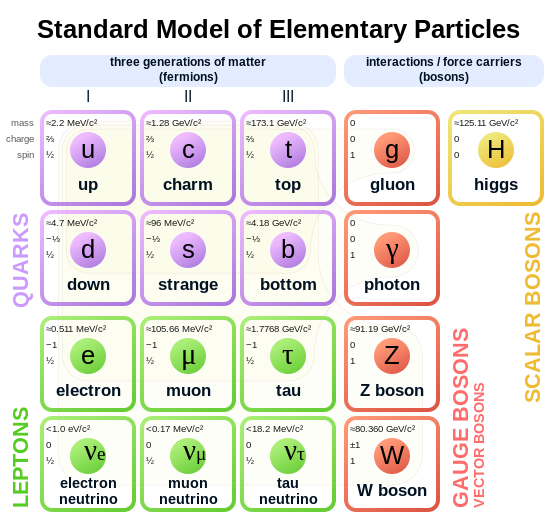
Using some more advaced symmetry groups all of our beloved standard particles can be found:

The standard model (without Higgs)

The group in red are called gauge bosons. They are resultants of a very special symmetry and they can be interpreted as forces working on all the other particles. In fact, every elementary force has a matching gague boson. The photon (symbolised with a gamma), or "light", transfers electromagnetic forces, the gluon the strong force and Z and W the weak force.

But there is a problem. The theory requires the W and Z boson to be massless in order for the theory to work. This is obviously not the case, because these particles have been found to have mass. In fact, they are pretty heavy!

The Higgs mechanism

When physicist discovered that the theory was in trouble, they started searching for solutions. The symmetry of nature that can be used to find the gauge bosons worked far too good to just abandon it. Then, a new idea rose: we keep the symmetry, but we say nature broke it spontaneously. Wait, what? 

How does this work? Imagine you have a piece of plastic between your fingers and you apply a little pressure to it. Initially, the plastic stick is straight, even when you apply a little pressure to it. Now the system (nature) has a symmetry: there is for example rotational symmetry if you are standing at the position of the rod (if you ignore the hand). 

But remember the hand was applying a force? This means that the stick could spontaneously jump to either the left or the right, as can be seen in the picture (try this at home ;) ). Now the symmetry that nature had is broken, spontaneously and without external help. Note that in the analogy, the hand should be seen as an initial energy that the universe has.


Spontaneous symmetry breaking

A similar scenario this of a toy car that is sitting on a small mountain, but it has some energy which makes the car shift a little. Given enough time, the car will roll off the mountain into a valley, where it will remain.

Imagine a toy car in this figure


Now, it turns out that breaking this symmetry can be done by introducing a particle: the Higgs particle. When analysing the properties of this particle, it turns out that this particle interacts with all the other particles, including itself! Due to these interactions, the particles gain mass.

Why did this take so long to find?

Well, we didn't know where to look. Basically, in the LHC particles are shot at eachother with incredible speeds, and thus incredibly high energies. Since E=mc^2, it takes very high energies to create particles with high mass. The problem is, we don't know the mass of the Higgs, it is a free parameter of the theory. This means the mass is not predicted by the theory. And because of that, the whole LHC range has to be explored (with no guarantee that the Higgs boson is actually in this range).

Complications arise due to the fact the Higgs particle decays intoa lot of other particles very, very quickly. So we can actually only see the remnants of the Higgs particle. When there is enough energy to create a Higgs, we'd expect to see more of these remnants: a peak in a graph.

Today, the people at CERN announced that the peaks they found in many expirements, are trustworthy enough to say that the Higgs particle has been found at about 126 GeV. This is great news, because now we can confidently continue the search for theories that expand the standard model, like supersymmetry and other theories that may introduce gravity into the picture.

We aren't quite there yet, but a theory of everything is coming!

Saturday, November 26, 2011

Affine transformations and their inverse

When you're programming games or other 3d applications using OpenGL or DirectX, it is often required to use affine transformation matrices to describe transformations in space (4x4 matrices and the like). There is not a lot of documentation about this online, and most implementations I've seen, have some sort of hack. In this tutorial, I'll describe what affine transformations are, and more importantly, how to invert them correctly and efficiently. It is assumed that the reader knows what a matrices are and how to multiply them.

The affine transformation
Imagine you have a ball lying at (1,0) in your coordinate system. You want to move this ball to (0,2) by first rotating the ball 90 degrees to (0,1) and then moving it upwards with 1. This transformation is described by a rotation and translation. The rotation is: $$ \left[\begin{array}{cc} 0 & -1\\ 1 & 0\\ \end{array}\right] $$ and the translation is (0,1). To apply this transformation to a vector $\vec{x}$, we do: $$\vec{x}^\prime = R \vec{x} + \vec{T}$$ where R is a rotation matrix, and T is a translation vector. This is called an affine transformation.

If you're in 2d space, there is no 2x2 matrix that will do this transformation for all points. However, if we go one dimension higher, to a 3x3 matrix, you can! That's why OpenGL uses 4x4 matrices to describe 3d transformations, as we'll see later. 

The matrix representation
The best way to explain how to make this matrix, is to give the matrix for the example above.

$$ \left[\begin{array}{ccc} 0 & -1 & 0 \\ 1 & 0 & 1 \\ 0 & 0 & 1 \\ \end{array}\right]  $$

As you can see, the left upper block is the rotation matrix, and to the right going downwards we have our translation. Because it's a 3x3 matrix now, we have to apply it to a 3d vector. We take the vector we had, $(1,0)$, and set the third component to 1. See what happens:

$$ \left[\begin{array}{ccc} 0 & -1 & 0 \\ 1 & 0 & 1 \\ 0 & 0 & 1 \\ \end{array}\right] \begin{pmatrix} 1\\0\\1 \end{pmatrix} = \begin{pmatrix} 0\\2\\1 \end{pmatrix} $$

This gives the result we wanted! If you look closer to the matrix multiplication, we see why this works. The trick is to set the last component of the vector to 1, so that the translation just gets added. In a short-hand notation the matrix and vector look like this:

$$ \left[\begin{array}{c|c} R & T \\ \hline 0 & 1 \\ \end{array}\right] \begin{pmatrix} x\\ \hline 1 \end{pmatrix}=\begin{pmatrix} x^\prime\\ \hline 1 \end{pmatrix}$$

Inverting an affine transformation matrix
Sometimes it is very imporant to invert an affine transformation, for example to transform back from world space to object space. A naive approach is to just write a function that inverts 3x3 or 4x4 matrices. This is very inefficient,  because there are some nice properties we can use.


If we think about what happens when we apply the affine transformation matrix, we rotate first over an angle $\alpha$, and then translate over $(T_x, T_y)$. So the inverse should translate first with $(-T_x, -T_y)$, and then rotate over $-\alpha$. Unfortunately, that's not what happens. What does happen is that the rotation is always applied first. So we have to correct for that by modifying our translation. A derivation:

$$
\begin{array}
\vec{x}^\prime = R\vec{x} + T \\
\vec{x}^\prime - T = R\vec{x} \\
R^{-1}(\vec{x}^\prime - T) = \vec{x}\\
\end{array}
$$

So to get back the original vector $\vec{x}$, we have a new affine transformation:

$$ \vec{x} = R^{-1}\vec{x}^\prime  - (R^{-1}T) $$

What we have to do now is calculate the inverse of a rotation matrix and using that result, calculate our new translation.


Let's recall how a general rotation matrix in 2d looks like:

$$ \left[\begin{array}{cc} \cos(\alpha) & - \sin(\alpha) \\ \sin(\alpha) & \cos(\alpha) \\ \end{array}\right] $$

Because a rotation matrix is unitary, the inverse of a rotation matrix is equal to its transpose, so inverting can be done very quickly:

$$ \left[\begin{array}{cc} \cos(\alpha) & \sin(\alpha) \\ -\sin(\alpha) & \cos(\alpha) \\ \end{array}\right] $$

Now all we have to do is apply this to T, to get all the components for our inverse matrix:

$$ \left[\begin{array}{c|c} R^{-1} & R^{-1}T \\ \hline 0 & 1 \\ \end{array}\right] \begin{pmatrix} x^\prime\\ \hline 1 \end{pmatrix}$$

Putting it together

As we've seen, general 2d affine transformation matrices look like

$$ \left[\begin{array}{ccc} \cos(\alpha) & - \sin(\alpha) & T_x \\ \sin(\alpha) & \cos(\alpha) & T_y \\ 0 & 0 & 1 \\ \end{array}\right] $$

Applying the strategy we've derived above, the inverse is:

$$ \left[\begin{array}{ccc} \cos(\alpha) & \sin(\alpha) & -T_x \cos(\alpha) - T_y \sin(\alpha) \\ -\sin(\alpha) & \cos(\alpha) & -T_y \cos(\alpha) + T_x \sin(\alpha) \\ 0 & 0 & 1 \\ \end{array}\right] $$


Expanding to 3d is trivial, since the same rules hold. For example, let's pick the rotation of $\theta$ over the axis $(0,1,0)$ and a translation $(1,2,3)$.

The matrix becomes:
$$ \left[\begin{array}{cccc} \cos(\theta) & 0 &  \sin(\theta) &1 \\ 0 & 1 & 0 & 2\\ -\sin(\theta) & 0 & \cos(\theta) & 3 \\ 0 & 0 & 0 & 1 \\ \end{array}\right] $$

And the inverse is:
$$
\left[


\begin{array}{cccc}
 \cos (\theta ) & 0 & -\sin (\theta ) & 3 \sin (\theta )-\cos (\theta ) \\
 0 & 1 & 0 & -2 \\
 \sin (\theta ) & 0 & \cos (\theta ) & -3 \cos (\theta )-\sin (\theta ) \\
 0 & 0 & 0 & 1
\end{array}

\right]

$$

These 4x4 matrices are the ones that OpenGL expects in functions like glMultMatrixf!

In order to use this knowledge in your code, you should write a matrix class that can 1) create a rotation matrix from an angle and axis 2) transpose a matrix and 3) be applied to a vector.


Conclusion
Hopefully this tutorial has helped you better grasp the concepts of affine transformations. We've seen the definition of these transformations and how to use those to find a shortcut for a quick inversion algorithm. If you have any questions, please let me know!

Tuesday, November 1, 2011

Facebook blacklisted me...

For a website I am building I want to have facebook authentication, which means that users don't have to make an account. In order to use their API, facebook forces you to make an actual profile on their website. With great reluctance, I made my profile page, getting flooded with requests and other messages instantly. Well, I thought, this is what I have to do to get my key. So then I went to the app registration page and I got the following message:
You can no longer create apps because our systems indicated that your account may not be authentic. Facebook requires users to provide their real first and last names, and fake accounts are a violation of our Statement of Rights and Responsibilities (SRR 4.1), even when used to host or test apps. Also note that maintaining multiple accounts, even if they are authentic, is also prohibited. If you would like to create a test user to test app functionality, you can do so here: http://developers.facebook.com/docs/test_users/. If you believe you have received this message in error, please submit an appeal: https://www.facebook.com/help/contact_us.php?id=140703502680919.
Seriously, WTF. After all that trouble I went through, their "systems" say my account is not authentic. What does that even mean, their systems? This completely baffles me, since I have dumped all sorts of personal stuff on there and I went through an SMS authentication. Nonetheless, their "systems" think I am lying.

 I am pretty pissed off right now. The API key proved to be one big carrot on a stick to lure me in. Now I have to scan government papers to actually prove I am who I am. If their oh so intelligent system doesn't think my passport is a fake, that is...

update: I have sent a heavily censored copy of my driver's license to facebook. I am un-blacklisted now.

Monday, October 31, 2011

Skills every programmer should have #1: Dynamic programming

During this course I'll try and describe several techniques and skills that every programming should have. Many of these subjects involve concepts that save a lot of time and provide easier solutions to problems than ad-hoc ones. If you have any suggestions, please let me know!

Dynamic programming

Dynamic programming is the first skill that every programmer should have. It can be used when you have a problem that can be split up into sub-problems that you've already calculated and cached. I have used it in numerous situations, including optimal control theory problems and Project Euler problems. An example:

Imagine you want to write an application that prints the factorial for every number up to N, so:

0! 1! 2! 3! ... N!

A naive solution would be
public class Main {
 public static long fac(int n) {
  if (n <= 1) {
   return 1;
  }

  return n * fac(n - 1);
 }

 public static void main(String[] args) {
  for (int i = 0; i < 10; i++) {
   System.out.println(fac(i));
  }
 }
}
This becomes very slow if N is large (in this example you can't make N too large, because the long overflows very quickly. Use BigInteger instead). However, if we look at the factorial function, we see that if we calculate 10!, we're recalculating 9!. We see that 10! = 10 * 9!. In general:
N! = N * (N-1)!

If we were to cache n! in a map, we'd be able to significantly reduce computation time. An improved solution:


public class Main {
 static Map<Integer, Long> facs = new HashMap<Integer, Long>();

 public static long fac(int n) {
  if (facs.containsKey(n)) {
   return facs.get(n);
  }
  
  if (n <= 1) {
   return 1;
  }

  long result = n * fac(n - 1);
  /* Add factorial to map. */
  facs.put(n, result);
  
  return result;
 }

 public static void main(String[] args) {

  for (int i = 1; i < 10; i++) {
   System.out.println(fac(i));
  }
 }
}
This is what's called dynamic programming and it is very useful to make seemingly infeasable solutions possible in exchange for memory. Let's look at a realistic example.

Best path in a triangle

Imagine you have a triangle like this:
   3
  7 4
 2 4 6
8 5 9 3
and you're aked to calculate the path with the optimal score. The score is calculated by adding all the numbers you go through. In this case the optimal score is 3 + 7 + 4 + 9 = 23. Note that this is problem 67 of the Euler Project, so if you want to try it for yourself first, you should stop reading here!

 This problem is easy to solve for small triangles, but for big triangles it becomes infeasable to calculate all the routes. We're now going to look at a triangle with a depth of 100. This means that there are 2^99 routes! Looking at the triangle above, we see that the value at the top is 3 + [the maximum of the subtree 7 and subtree 4].

This looks like a division into subproblems! If we were to cache the values of the tree at 7 and 4, we'd know the value at the top incredibly fast. The dynamic programming solution is thus as follows:

public class Main {
 /* Values at every point in the tree. */
 public static Map<Point, Integer> values;
 public static List<List<Integer>> tree;
 
 public static Integer getValue(Point p) {
  /* Check cache first. */
  if (values.containsKey(p)) {
   return values.get(p);
  }
  
  /* Boundary conditions. */
  if (p.y == tree.size() - 1) {
   return tree.get(p.y).get(p.x);
  }
  
  /* Get the values of the two subtrees. */
  Integer left = getValue(new Point(p.x, p.y + 1));
  Integer right = getValue(new Point(p.x + 1, p.y + 1));
  Integer value = tree.get(p.y).get(p.x) + Math.max(left, right);
  
  values.put(p, value);
  return value;  
 }

 public static void main(String[] args) {
  /* TODO: read tree from file. */
  
  System.out.println(getValue(new Point(0,0)));
 }

}

This solution is a sketch. I leave parsing the tree from a file as an exercise to the reader. Note that if you're serious about perfomance, using Integer and other boxed types is a bad idea. I would strongly recommend using the Trove High Performance Collections for the cache.

 Until next time!

Saturday, August 27, 2011

Lazy loading of images in Listview

A common scenario is adding images to a Listview. For example, if you´re making a cocktail recipe app, you´d want a picture next to the cocktail name. Sometimes the images should be retrieved from the internet and then be displayed. Unfortunately, this is difficult to do right. If you´ve tried it, you´ve probably noticed performance hits, or some strange glitches. In this tutorial, I´ll show you how to download images and display them. We´ll also discuss some pitfalls, like recycling and concurrency.


Setting up the listview
I assume you already know how to define a row layout for a Listview and know about adapters.

Below is an example of an adapter for an RSS reader. The text data is retrieved from an Article class, which contains the title of the Article, the author and the publication date. To make the tutorial more clear, I have an explicit list of URLs that will be used for the images of each entry.

public class ListAdapter extends ArrayAdapter<Article> {
 private List<Article> articles;
 private Context context;
 private final LayoutInflater inflator;

 private static final String[] URLS = {
   "http://lh5.ggpht.com/_mrb7w4gF8Ds/TCpetKSqM1I/AAAAAAAAD2c/Qef6Gsqf12Y/s144-c/_DSC4374%20copy.jpg",
   "http://lh5.ggpht.com/_Z6tbBnE-swM/TB0CryLkiLI/AAAAAAAAVSo/n6B78hsDUz4/s144-c/_DSC3454.jpg",
   "http://lh3.ggpht.com/_GEnSvSHk4iE/TDSfmyCfn0I/AAAAAAAAF8Y/cqmhEoxbwys/s144-c/_MG_3675.jpg",
   "http://lh6.ggpht.com/_Nsxc889y6hY/TBp7jfx-cgI/AAAAAAAAHAg/Rr7jX44r2Gc/s144-c/IMGP9775a.jpg",
   "http://lh3.ggpht.com/_lLj6go_T1CQ/TCD8PW09KBI/AAAAAAAAQdc/AqmOJ7eg5ig/s144-c/Juvenile%20Gannet%20despute.jpg",
   "http://lh6.ggpht.com/_ZN5zQnkI67I/TCFFZaJHDnI/AAAAAAAABVk/YoUbDQHJRdo/s144-c/P9250508.JPG",
   "http://lh4.ggpht.com/_XjNwVI0kmW8/TCOwNtzGheI/AAAAAAAAC84/SxFJhG7Scgo/s144-c/0014.jpg",
   "http://lh6.ggpht.com/_lnDTHoDrJ_Y/TBvKsJ9qHtI/AAAAAAAAG6g/Zll2zGvrm9c/s144-c/000007.JPG",
   "http://lh6.ggpht.com/_qvCl2efjxy0/TCIVI-TkuGI/AAAAAAAAOUY/vbk9MURsv48/s144-c/DSC_0844.JPG",
   "http://lh4.ggpht.com/_4f1e_yo-zMQ/TCe5h9yN-TI/AAAAAAAAXqs/8X2fIjtKjmw/s144-c/IMG_1786.JPG",
   "http://lh6.ggpht.com/_iFt5VZDjxkY/TB9rQyWnJ4I/AAAAAAAADpU/lP2iStizJz0/s144-c/DSCF1014.JPG",
   "http://lh5.ggpht.com/_hepKlJWopDg/TB-_WXikaYI/AAAAAAAAElI/715k4NvBM4w/s144-c/IMG_0075.JPG",
   "http://lh6.ggpht.com/_OfRSx6nn68g/TCzsQic_z3I/AAAAAAABOOI/5G4Kwzb2qhk/s144-c/EASTER%20ISLAND_Hanga%20Roa_31.5.08_46.JPG",
   "http://lh6.ggpht.com/_ZGv_0FWPbTE/TB-_GLhqYBI/AAAAAAABVxs/cVEvQzt0ke4/s144-c/IMG_1288_hf.jpg",
   "http://lh6.ggpht.com/_a29lGRJwo0E/TBqOK_tUKmI/AAAAAAAAVbw/UloKpjsKP3c/s144-c/31012332.jpg",
   "http://lh3.ggpht.com/_55Lla4_ARA4/TB6xbyxxJ9I/AAAAAAABTWo/GKe24SwECns/s144-c/Bluebird%20049.JPG",
   "http://lh3.ggpht.com/_iVnqmIBYi4Y/TCaOH6rRl1I/AAAAAAAA1qg/qeMerYQ6DYo/s144-c/Kwiat_100626_0016.jpg",
   "http://lh6.ggpht.com/_QFsB_q7HFlo/TCItd_2oBkI/AAAAAAAAFsk/4lgJWweJ5N8/s144-c/3705226938_d6d66d6068_o.jpg",
   "http://lh5.ggpht.com/_JTI0xxNrKFA/TBsKQ9uOGNI/AAAAAAAChQg/z8Exh32VVTA/s144-c/CRW_0015-composite.jpg",
   "http://lh6.ggpht.com/_loGyjar4MMI/S-InVNkTR_I/AAAAAAAADJY/Fb5ifFNGD70/s144-c/Moving%20Rock.jpg",
   "http://lh4.ggpht.com/_L7i4Tra_XRY/TBtxjScXLqI/AAAAAAAAE5o/ue15HuP8eWw/s144-c/opera%20house%20II.jpg",
   "http://lh3.ggpht.com/_rfAz5DWHZYs/S9cstBTv1iI/AAAAAAAAeYA/EyZPUeLMQ98/s144-c/DSC_6425.jpg",
   "http://lh6.ggpht.com/_iGI-XCxGLew/S-iYQWBEG-I/AAAAAAAACB8/JuFti4elptE/s144-c/norvig-polar-bear.jpg",
   "http://lh3.ggpht.com/_M3slUPpIgmk/SlbnavqG1cI/AAAAAAAACvo/z6-CnXGma7E/s144-c/mf_003.jpg",
   "http://lh4.ggpht.com/_loGyjar4MMI/S-InQvd_3hI/AAAAAAAADIw/dHvCFWfyHxQ/s144-c/Rainbokeh.jpg",
   "http://lh4.ggpht.com/_yy6KdedPYp4/SB5rpK3Zv0I/AAAAAAAAOM8/mokl_yo2c9E/s144-c/Point%20Reyes%20road%20.jpg",
   "http://lh5.ggpht.com/_6_dLVKawGJA/SMwq86HlAqI/AAAAAAAAG5U/q1gDNkmE5hI/s144-c/mobius-glow.jpg",
   "http://lh3.ggpht.com/_QFsB_q7HFlo/TCItc19Jw3I/AAAAAAAAFs4/nPfiz5VGENk/s144-c/4551649039_852be0a952_o.jpg",
   "http://lh6.ggpht.com/_TQY-Nm7P7Jc/TBpjA0ks2MI/AAAAAAAABcI/J6ViH98_poM/s144-c/IMG_6517.jpg",
   "http://lh3.ggpht.com/_rfAz5DWHZYs/S9cLAeKuueI/AAAAAAAAeYU/E19G8DOlJRo/s144-c/DSC_4397_8_9_tonemapped2.jpg",
   "http://lh4.ggpht.com/_TQY-Nm7P7Jc/TBpi6rKfFII/AAAAAAAABbg/79FOc0Dbq0c/s144-c/david_lee_sakura.jpg",
   "http://lh3.ggpht.com/_TQY-Nm7P7Jc/TBpi8EJ4eDI/AAAAAAAABb0/AZ8Cw1GCaIs/s144-c/Hokkaido%20Swans.jpg",
   "http://lh3.ggpht.com/_1aZMSFkxSJI/TCIjB6od89I/AAAAAAAACHM/CLWrkH0ziII/s144-c/079.jpg",
   "http://lh5.ggpht.com/_loGyjar4MMI/S-InWuHkR9I/AAAAAAAADJE/wD-XdmF7yUQ/s144-c/Colorado%20River%20Sunset.jpg",
   "http://lh3.ggpht.com/_0YSlK3HfZDQ/TCExCG1Zc3I/AAAAAAAAX1w/9oCH47V6uIQ/s144-c/3138923889_a7fa89cf94_o.jpg",
   "http://lh6.ggpht.com/_K29ox9DWiaM/TAXe4Fi0xTI/AAAAAAAAVIY/zZA2Qqt2HG0/s144-c/IMG_7100.JPG",
   "http://lh6.ggpht.com/_0YSlK3HfZDQ/TCEx16nJqpI/AAAAAAAAX1c/R5Vkzb8l7yo/s144-c/4235400281_34d87a1e0a_o.jpg",
   "http://lh4.ggpht.com/_8zSk3OGcpP4/TBsOVXXnkTI/AAAAAAAAAEo/0AwEmuqvboo/s144-c/yosemite_forrest.jpg",
   "http://lh4.ggpht.com/_6_dLVKawGJA/SLZToqXXVrI/AAAAAAAAG5k/7fPSz_ldN9w/s144-c/coastal-1.jpg",
   "http://lh4.ggpht.com/_WW8gsdKXVXI/TBpVr9i6BxI/AAAAAAABhNg/KC8aAJ0wVyk/s144-c/IMG_6233_1_2-2.jpg",
   "http://lh3.ggpht.com/_loGyjar4MMI/S-InS0tJJSI/AAAAAAAADHU/E8GQJ_qII58/s144-c/Windmills.jpg",
   "http://lh4.ggpht.com/_loGyjar4MMI/S-InbXaME3I/AAAAAAAADHo/4gNYkbxemFM/s144-c/Frantic.jpg",
   "http://lh5.ggpht.com/_loGyjar4MMI/S-InKAviXzI/AAAAAAAADHA/NkyP5Gge8eQ/s144-c/Rice%20Fields.jpg",
   "http://lh3.ggpht.com/_loGyjar4MMI/S-InZA8YsZI/AAAAAAAADH8/csssVxalPcc/s144-c/Seahorse.jpg",
   "http://lh3.ggpht.com/_syQa1hJRWGY/TBwkCHcq6aI/AAAAAAABBEg/R5KU1WWq59E/s144-c/Antelope.JPG",
   "http://lh5.ggpht.com/_MoEPoevCLZc/S9fHzNgdKDI/AAAAAAAADwE/UAno6j5StAs/s144-c/c84_7083.jpg",
   "http://lh4.ggpht.com/_DJGvVWd7IEc/TBpRsGjdAyI/AAAAAAAAFNw/rdvyRDgUD8A/s144-c/Free.jpg",
   "http://lh6.ggpht.com/_iO97DXC99NY/TBwq3_kmp9I/AAAAAAABcz0/apq1ffo_MZo/s144-c/IMG_0682_cp.jpg",
   "http://lh4.ggpht.com/_7V85eCJY_fg/TBpXudG4_PI/AAAAAAAAPEE/8cHJ7G84TkM/s144-c/20100530_120257_0273-Edit-2.jpg" };

 private static class ViewHolder {
  public ImageView iconView;
  public TextView nameTextView;
  public TextView bottomText;
 }

 public ListAdapter(Context context, int textViewResourceId,
   List<Article> articles) {
  super(context, textViewResourceId, articles);
  this.articles = articles;
  this.context = context;
  inflator = (LayoutInflater) context
    .getSystemService(Context.LAYOUT_INFLATER_SERVICE);

  BitmapManager.INSTANCE.setPlaceholder(BitmapFactory.decodeResource(
    context.getResources(), R.drawable.icon));
 }

 @Override
 public View getView(int position, View convertView, ViewGroup parent) {
  ViewHolder holder;

  if (convertView == null) {
   convertView = inflator.inflate(R.layout.article_row, null);

   TextView nameTextView = (TextView) convertView
     .findViewById(R.id.title);
   TextView bottomText = (TextView) convertView
     .findViewById(R.id.bottomtext);
   ImageView iconView = (ImageView) convertView
     .findViewById(R.id.article_icon);
   holder = new ViewHolder();
   holder.nameTextView = nameTextView;
   holder.bottomText = bottomText;
   holder.iconView = iconView;
   convertView.setTag(holder);
  } else {
   holder = (ViewHolder) convertView.getTag();
  }

  Article article = articles.get(position);
  holder.nameTextView.setText(article.getTitle());
  holder.bottomText.setText(article.getAuthor() + " | "
    + article.getPubDate());

  holder.iconView.setTag(URLS[position]);
  BitmapManager.INSTANCE.loadBitmap(URLS[position], holder.iconView, 32,
    32);

  return convertView;
 }
}


As you can see, I am recycling the view, because I only inflate from XML when convertView == null. I also store references to all the children views in a tag. Recycling and tagging greatly improves performance, as can be seen in this Google Conference video.

Downloading the bitmaps
A naive way to download a bitmap is to just make a http connection in the getView and set the bitmap using iconView.setImageBitmap(). This would cause severe lag, because the UI thread would have to wait until the image is downloaded. What we want is to download in a separate thread. We also want some kind of cache to store downloaded bitmaps.

All this can be done in a singleton BitmapManager. Here is the download function:

private Bitmap downloadBitmap(String url, int width, int height) {
  try {
   Bitmap bitmap = BitmapFactory.decodeStream((InputStream) new URL(
     url).getContent());
   bitmap = Bitmap.createScaledBitmap(bitmap, width, height, true);
   cache.put(url, new SoftReference<Bitmap>(bitmap));
   return bitmap;
  } catch (MalformedURLException e) {
   e.printStackTrace();
  } catch (IOException e) {
   e.printStackTrace();
  }

  return null;
 }
I don't know if this is the optimal way to download a file, so if you know a better way, please leave a message. As you can see, the bitmap is stored in cache, which is defined as Map<String, SoftReference<Bitmap>> cache;. We are using a SoftReference, because we want the bitmap to be garbage collected if the VM is low on memory.

The recycle trap
As I've mentioned before, the row view can be recycled. This means that, if you're scrolling, the view of a row that slides off the screen, can be used as the view of a row that comes into the screen. For example, row 1 disappears and row 3 appears during scrolling. When row 1 was on the screen, the download of the image started. Now imagine that the downloaded of the image of row 1 takes a very long time. When row 3 appears, the image of row 3 is put into the queue. It may happen that this download finishes before the one of row 1, which means that the picture of row 3 will be the one of row 1.

Row 1 visible: start download of image 1
Scrolling
Row 3 visible (recycled view of row 1): start download of image 3
Download of image 3 done: row 3 image set to image 3
Download of image 1 done: row 3 image set to image 1

In order to avoid these recycling issues, we have to store the URL that is lastly associated with the ImageView. If a download is completed, but is not associated with the view anymore (image 1, in the example above), the download is ignored. This is the association map: Map<ImageView, String> imageViews = Collections.synchronizedMap(new WeakHashMap<ImageView, String>());.

Retrieving the bitmap
 public void loadBitmap(final String url, final ImageView imageView,
   final int width, final int height) {
  imageViews.put(imageView, url);
  Bitmap bitmap = getBitmapFromCache(url);

  // check in UI thread, so no concurrency issues
  if (bitmap != null) {
   Log.d(null, "Item loaded from cache: " + url);
   imageView.setImageBitmap(bitmap);
  } else {
   imageView.setImageBitmap(placeholder);
   queueJob(url, imageView, width, height);
  }
 }
The first thing we do when we load the bitmap, is associating the URL with the ImageView. Then we see if the bitmap is in the cache. If so, we load it from cache, or else we queue the download.
It should be noted that the loadBitmap function is called in the UI thread, which means that we don't have to check if the imageView is recycled and we can call functions like setImageBitmap directly.

The working thread
All that's left now is to call the downloadBitmap function from a new thread. Most code I saw online just spawns a new thread, but that can become very inefficient. Imagine that the Listview contains 500 items: that would mean that 500 threads would be spawned! Instead, we use the ExecutorService class from the Java Concurrency framework. We create a fixed thread pool (newFixedThreadPool) with 5 items (this number is arbitrary, I haven't tested which amount is optimal), which means that there will be up to five images that are downloaded at the same time. All the other downloads are stored in an unbounded queue.

public void queueJob(final String url, final ImageView imageView,
   final int width, final int height) {
  /* Create handler in UI thread. */
  final Handler handler = new Handler() {
   @Override
   public void handleMessage(Message msg) {
    String tag = imageViews.get(imageView);
    if (tag != null && tag.equals(url)) {
     if (msg.obj != null) {
      imageView.setImageBitmap((Bitmap) msg.obj);
     } else {
      imageView.setImageBitmap(placeholder);
      Log.d(null, "fail " + url);
     }
    }
   }
  };

  pool.submit(new Runnable() {
   @Override
   public void run() {
    final Bitmap bmp = downloadBitmap(url, width, height);
    Message message = Message.obtain();
    message.obj = bmp;
    Log.d(null, "Item downloaded: " + url);

    handler.sendMessage(message);
   }
  });
 }
This code adds a new Runnable to the queue, which downloads the bitmap. Then it sends a message to a handler. A handler is used because all interactions with the UI have to be done in the UI thread. This means that we cannot directly set the image bitmap. A handler should be created in the thread the message will be handled in, so that's why we have to move the code outside of the Runnable anonymous class.

In handleMessage the bitmap is retrieved from msg.obj. The bitmap is only set if the current URL is the last one to be associated with the ImageView. If the download failed for some reason, a placeholder is used.

Conclusion
And there you have it. We've made a lazy loading bitmap manager that works with recycled listviews. Some things could be done to improve performance even more, for example cancelling downloads if the view is destroyed and preventing downloading the same file at the same time. Anyhow, if you found this tutorial helpful, please leave a message :)


Full code
public enum BitmapManager {
 INSTANCE;

 private final Map<String, SoftReference<Bitmap>> cache;
 private final ExecutorService pool;
 private Map<ImageView, String> imageViews = Collections
   .synchronizedMap(new WeakHashMap<ImageView, String>());
 private Bitmap placeholder;

 BitmapManager() {
  cache = new HashMap<String, SoftReference<Bitmap>>();
  pool = Executors.newFixedThreadPool(5);
 }

 public void setPlaceholder(Bitmap bmp) {
  placeholder = bmp;
 }

 public Bitmap getBitmapFromCache(String url) {
  if (cache.containsKey(url)) {
   return cache.get(url).get();
  }

  return null;
 }

 public void queueJob(final String url, final ImageView imageView,
   final int width, final int height) {
  /* Create handler in UI thread. */
  final Handler handler = new Handler() {
   @Override
   public void handleMessage(Message msg) {
    String tag = imageViews.get(imageView);
    if (tag != null && tag.equals(url)) {
     if (msg.obj != null) {
      imageView.setImageBitmap((Bitmap) msg.obj);
     } else {
      imageView.setImageBitmap(placeholder);
      Log.d(null, "fail " + url);
     }
    }
   }
  };

  pool.submit(new Runnable() {
   @Override
   public void run() {
    final Bitmap bmp = downloadBitmap(url, width, height);
    Message message = Message.obtain();
    message.obj = bmp;
    Log.d(null, "Item downloaded: " + url);

    handler.sendMessage(message);
   }
  });
 }

 public void loadBitmap(final String url, final ImageView imageView,
   final int width, final int height) {
  imageViews.put(imageView, url);
  Bitmap bitmap = getBitmapFromCache(url);

  // check in UI thread, so no concurrency issues
  if (bitmap != null) {
   Log.d(null, "Item loaded from cache: " + url);
   imageView.setImageBitmap(bitmap);
  } else {
   imageView.setImageBitmap(placeholder);
   queueJob(url, imageView, width, height);
  }
 }

 private Bitmap downloadBitmap(String url, int width, int height) {
  try {
   Bitmap bitmap = BitmapFactory.decodeStream((InputStream) new URL(
     url).getContent());
   bitmap = Bitmap.createScaledBitmap(bitmap, width, height, true);
   cache.put(url, new SoftReference<Bitmap>(bitmap));
   return bitmap;
  } catch (MalformedURLException e) {
   e.printStackTrace();
  } catch (IOException e) {
   e.printStackTrace();
  }

  return null;
 }
}


In case you're wondering, an enum is the preferred way to create a singleton class.